Printing as a service
Your printer represents a risk!
Printers are a popular target for cyber attacks
Secure printing is becoming increasingly important - why and how you should act
61% of organizations report printer-related data breaches within a year, yet 43% do not include printer security in their security measures. Unprotected printer environments pose many risks and can be costly due to the lack of printer security. Cybercriminals, internal security breaches and compliance violations can cause damage to companies.
Because the same applies to secure printing: every hardware decision is also a security decision.
What is often forgotten when it comes to secure printing is that modern printers work in a similar way to PCs. This means that they also offer the same gateways and risks as other end devices. However, only 16% of companies are aware of this risk. Many are not aware of how many vulnerabilities jeopardize security when printing.
Weak points in printing
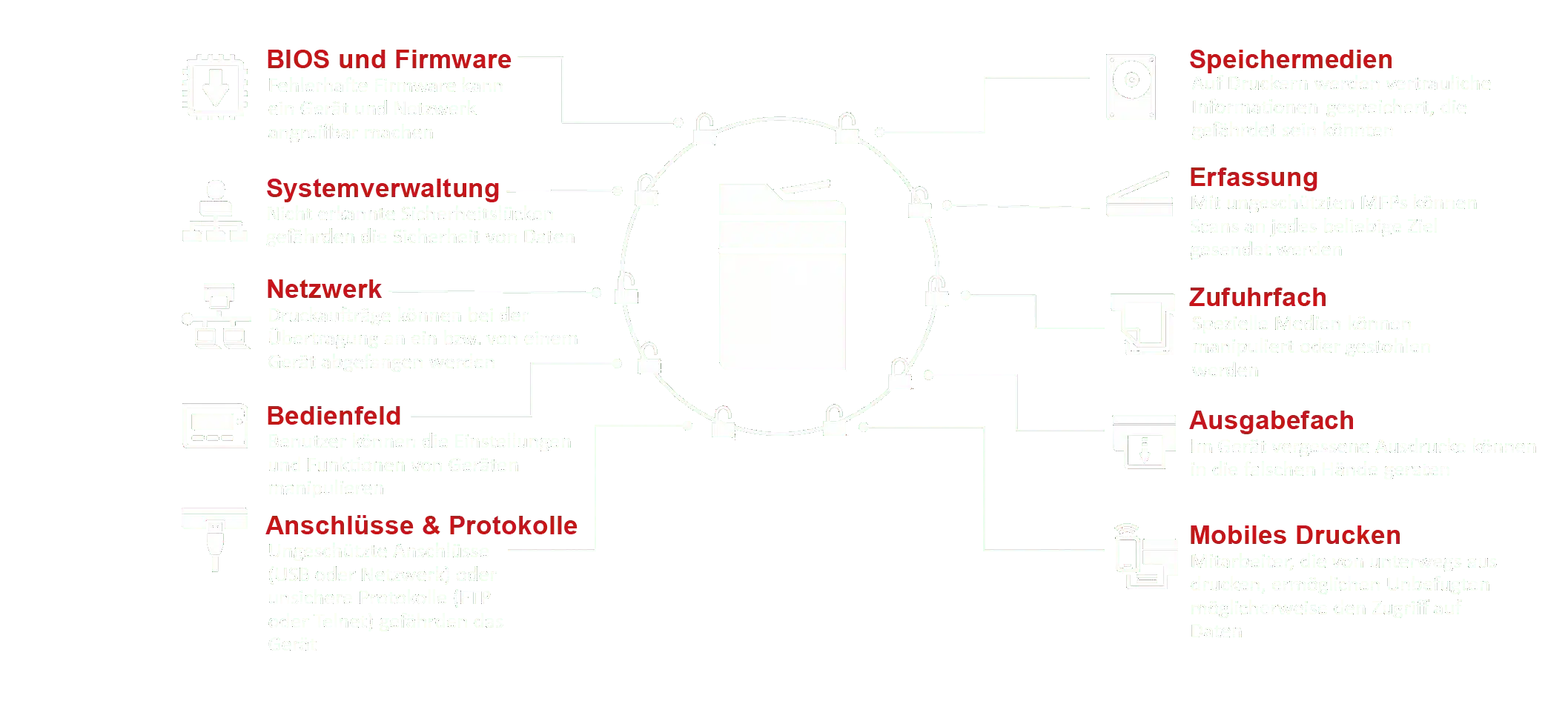
Necessary elements for secure printing
In order for secure printing to be implemented in a company, various elements need to be considered and measures introduced:

Secure printing
Data protection
User authentication is required to prevent unauthorized access to data. This can be solved centrally for each employee through appropriate user administration and authorizations.
Printer security should also be increased by encrypting the data. This means that the data is never available in unencrypted form and is only converted into plain text during the actual printing process.
The third aspect of data protection in the field of secure printing is the detection of threats. Modern multifunction devices can independently detect and automatically rectify security problems. One of these possibilities is, for example, the deletion of stored data in the event of an acute attempt at data theft.

Secure printing
Protection of documents
One way to increase security when printing is to protect the documents themselves. At the workplace, for example, this could be achieved using device PINs, control panel locks or a token system in which users can collect their printouts directly from the printer using a token.
Compliance guidelines are essential for secure printing. They show secure document workflows with which there is a clear regulation as to when and which person receives the necessary documents. Forgery protection can prevent document manipulation and the associated attempts at fraud.

Secure printing
Protection of the devices
Particular importance should be attached to protecting the devices when establishing secure printing. In addition to integrated encryption, which securely encrypts the data stored on the hard disks of the multifunction devices, secure deletion should also be made possible.
For secure printing, it is essential that the data cannot be restored after deletion. This aspect is underestimated by many companies and allows attackers to restore and steal documents once they have been deleted.
This aspect is particularly essential when disposing of printers. It often happens that printers that are no longer needed are simply disposed of. Attackers can very quickly gain access to these printers, connect them to their own network and access all documents. Printer security does not end with a trip to the scrap yard.
Ideally, the printer should already have integrated security functions. This enables the printer not only to detect attacks, but also to directly initiate countermeasures to maintain printer security.

There are already a number of mechanisms in place to enable secure printing.
The manufacturer HP in particular offers a range of options here:
Of particular note is the HP JetAdvantage Security Manager, which provides comprehensive security management with policy-based printer security compliance. It simplifies the monitoring and protection of the entire printer fleet, saving companies time and resources and enabling secure printing.
The security management process - The process for secure printing
With this tried and tested security management process, you can maintain a high level of printer security for your fleet and protect yourself against attacks:
Create/check guideline
Learn more
The first step is to create a policy that the company's employees must adhere to. This should include all aspects that are necessary for secure printing. Who uses which printer? When do documents have to be collected? Are certain documents only allowed to be printed on defined printers? The guidelines should check these aspects.
This step begins the process and is the starting point for every optimization loop. It should be regularly checked whether the guidelines still correspond to the current state of the art and meet the current requirements in order to enable secure printing in the long term.
Add devices
Learn more
Evaluate devices
Learn more
Eliminate security problems
Learn more
Extend certificates
Learn more
Check results
Learn more
The final step is to check the success of the previous measures. Have all policies been assigned correctly or do groups of people have access to printers that should not be able to access them? A stress test in which employees attempt to access the printers from outside is also conceivable. Do the security measures withstand this simulated attack?
Often forgotten when printing securely: The protection of your documents
Sensitive data
is often visible!
If you consistently apply these protection mechanisms for the devices, you have already done a lot for print security, but secure printing does not end when the printed paper is ejected. After all, what about document and data protection?
Confidential documents should also remain confidential. Therefore, shared printer queues, for example, can pose a security risk. Document names, for example, can be seen in conjunction with the initiator's Windows ID in the job window of the printer queue. This allows users to spy out sensitive data unhindered.
Sensitive data are for example:
- Payroll accounting
- Terminations
- Sick notes
- Evaluation of an employee
IT-HAUS Solutions for pressure safety
Reduction of forgotten printouts and protection of confidential documents
Secure Print and Follow-me solutions guarantee a high level of protection for confidential and sensitive data. All network printers thus become personal printers, as the documents to be printed are initially stored on the print server until the user authenticates himself and retrieves the documents. The data is encrypted by default so that it cannot be intercepted via the network.
IT-HAUS offers the following advantages
The following print management options are available
Managed print services that make your print environment secure
At IT-HAUS , you will find specialists who know all about print security and who enable secure printing for your company. They are happy to take care of improving the security of devices, data and documents.
We would be happy to carry out a printer security assessment with you as part of our security check. This enables us to uncover weak points before a failure occurs.
The security experts at IT-HAUS GmbH take into account the "human factor" as well as the technical basics and processes in their assessment. After the security check, you will receive a security strategy tailored precisely to your company, which can also include the entire IT system in addition to the printer security assessment if required.

Our experts will be happy to advise you on the individual options.
Fill out our contact form or call us directly. We look forward to talking to you.
You are currently viewing placeholder content from Microsoft Dynamics Forms. To access the actual content, click the button below. Please note that this will result in data being shared with third parties.
More Information
Strong partners for future-proof IT solutions