Access to the future of AI at no extra cost?
Microsoft's Copilots explained!

In recent weeks and months, Microsoft has published countless announcements relating to artificial intelligence and "Copilot". So many that small and medium-sized customers in particular have lost track. The one or other renaming of existing offers has also contributed to this. This article brings light into the darkness and gives concrete recommendations on how companies should start their journey with Microsoft Copilot.
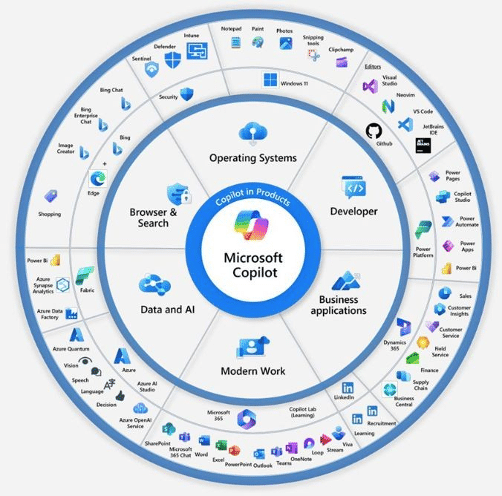
To clear up the biggest misunderstanding right at the start: there is no "one" co-pilot, but a multitude of individual co-pilots. Each individual co-pilot is designed to support the user in completing their tasks in the context of the respective application.
The distinction between different co-pilots is sometimes unclear and not always easy to understand. This is partly understandable as Microsoft introduces new innovations very quickly. Some functions are exclusive to certain copilots, while other functions are similar but are made accessible through different user interfaces.
Microsoft Copilot in Windows
Microsoft has boldly announced the "Copilot in Windows" and provides the following examples of its capabilities:
- Turn on dark mode
- Mute volume
- Change wallpaper
- Take a screenshot
- Set a focus timer for 30 minutes
- Open File Explorer
- Why isn't my audio working?
Windows Copilot will also serve as a user interface to "Microsoft Copilot" (more on this in a moment).

Problem: Windows Copilot is currently not available in the EU. Microsoft itself describes it like this:
Copilot on Windows is being released as a preview version for selected global markets as part of our latest update to Windows 11. The first markets to preview Copilot in Windows include North America and parts of Asia and South America. It is our intention to add more markets over time.
Accordingly, the Win-C key combination for calling up Copilot in Windows is not active in this country, and the Copilot icon does not appear in the taskbar either - not even in the latest release 23H2 of Windows 11.
Microsoft 365 Copilot
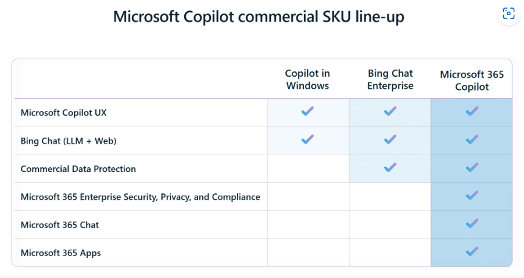
You might be thinking "Why preview version? Microsoft has announced the general availability of Copilot on November 1, 2023?". Unfortunately, you've been misled by Microsoft's confusing naming policy: The announcement of general availability refers to "Microsoft 365 Copilot" and "Microsoft 365 Chat" (more on that in a moment, too).
For some time now, Microsoft has combined both online services (e.g. Exchange Online, Teams) and desktop applications such as Word / Excel / PowerPoint / Outlook / OneNote (as "Apps for Business" or "Apps for Enterprise") under the name "Microsoft 365". Microsoft 365 Copilot is therefore a prerequisite for prompts (commands) such as:
-
-
- Add a Column to the table for the project owner
- Make all cells red where the value is under 1000
- Create an inspiring presentation for a team meeting
-
The great added value of Microsoft 365 Copilot is access to the Microsoft Graph API, which enables access to documents, emails, appointments, etc. (stored online in Microsoft 365). This also enables more complex queries such as:
-
-
- Create a written proposal for opportunity <reference to opportunity in dynamics> in the style of <reference to existing proposal in my OneDrive for Business>
- What are the five most urgent e-mails in my inbox
-
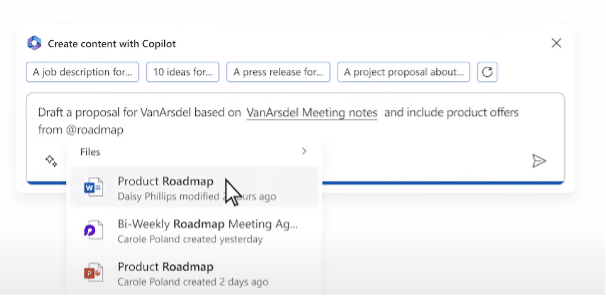
After Microsoft 365 Copilot was initially only available to (large) customers with an existing Microsoft Enterprise Agreement (EA), Microsoft 365 Copilot has been available to all customers via the Microsoft CSP program since mid-January 2024 - from just one user at a price of EUR 337.20 per user per year.
Microsoft Copilot (formerly Bing Chat Enterprise)
In November 2023, Microsoft simply renamed the service that was initially launched as Bing Chat Enterprise, sometimes also referred to as "Copilot in Edge", to "Microsoft Copilot". On the one hand, this is logical, as Microsoft Copilot is the central interface for users getting started with AI. On the other hand, it is confusing because Microsoft Copilot does not require the expensive licensing of Microsoft 365 Copilot. On the contrary: Microsoft Copilot can already be used today at no extra charge by all users who have one of the following license plans:
-
-
- Microsoft 365 Business Standard / Business Premium
- Microsoft 365 E3 / E5
- Microsoft F3 (currently with restrictions)
- Microsoft A3 / A5 for teachers
-
Microsoft Copilot is based on the same language models (Large Language Models, LLM) from OpenAI that are also used by ChatGPT, for example. As a so-called "generative AI", Microsoft Copilot can generate content in the form of text or images from user input ("prompts"). Generative AI is designed to help users to be creative and efficient at the same time.
Important: Microsoft Copilot aims to provide users with drafts and suggestions that are then refined and finalized by the user. Microsoft Copilot is not intended to replace users. Hence the name "Copilot" - and not "Autopilot".
The decisive added value of Microsoft Copilot compared to ChatGPT is that the data entered is subject to an appropriate level of protection for corporate use - for example, Microsoft Copilot guarantees that no input data will be used as training data for future developments of the language models. Who wants employees of market competitors to later be able to access the knowledge of my company that was (often unknowingly) sent to ChatGPT by my own employees as part of a prompt...

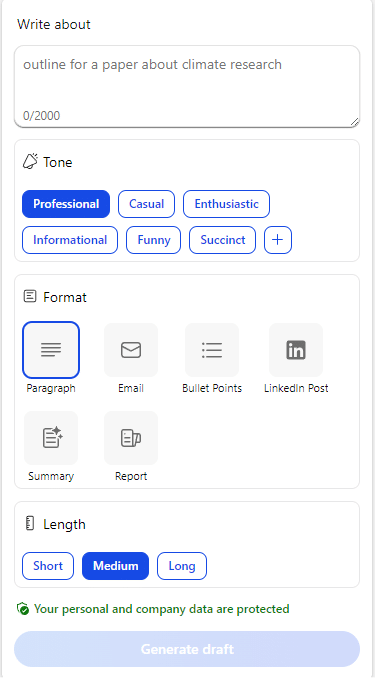
Microsoft Copilot offers pre-configured basic settings for typical content creation purposes to help employees achieve the desired result quickly and easily.
Summary
(Almost) all companies that already use Microsoft 365 can already benefit from artificial intelligence - at no extra cost. Thanks to Microsoft Copilot (formerly Bing Chat Enterprise), employees have the diverse possibilities of generative AI at their disposal, e.g. to support them in the formulation of business letters or social media posts or in the creation of illustrative graphics. In contrast to ChatGPT, the use of Microsoft Copilot is compatible with information security requirements and can thus remove previous obstacles to the use of artificial intelligence.
With Microsoft 365 Copilot (as an expansion stage of Microsoft Copilot), companies have even more options at their disposal by including the personal (data) context of the respective employee in the artificial intelligence. Over time, pricing models that are more attractive for small and medium-sized enterprises are expected.
Our tip:
To prepare for the use of Microsoft 365 Copilot, companies should review their security and authorization structures and compliance processes today to prevent unwanted information leaks tomorrow.

Which topics can our Microsoft experts support you with?
Contact us and we will support you on your way to a productive and successful digital future.
Our contacts who specialize in Microsoft 365 and its various solutions will be happy to advise you.
You are currently viewing placeholder content from Microsoft Dynamics Forms. To access the actual content, click the button below. Please note that this will result in data being shared with third parties.
More Information